01Oil and gas
Nobody goes offshore on an expired ticket.
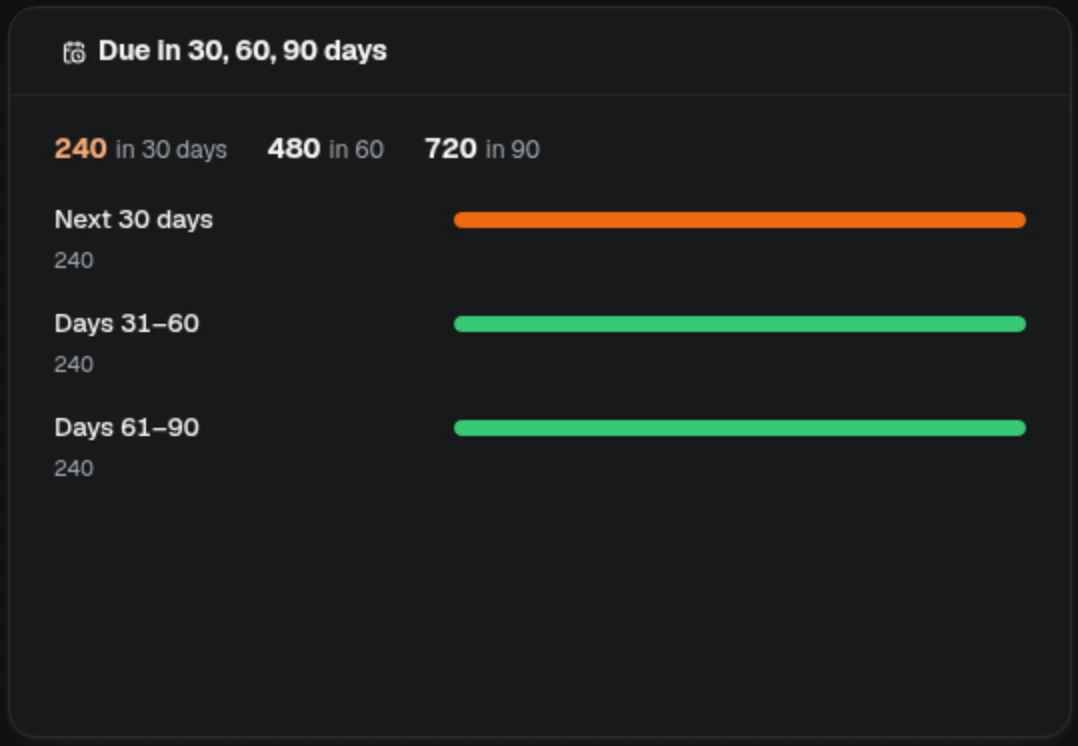
Every requirement for every person is tracked to its due date, most urgent first, so who is due is known before the rota is set, not at the gate.
The training operation behind every qualified person: classes, trainers, requirements and the record that proves it. Refined by GeoMetrix since 1992 for Fortune 500 companies and governments in almost every industry, from defence and aerospace to semiconductors and pharmaceuticals.
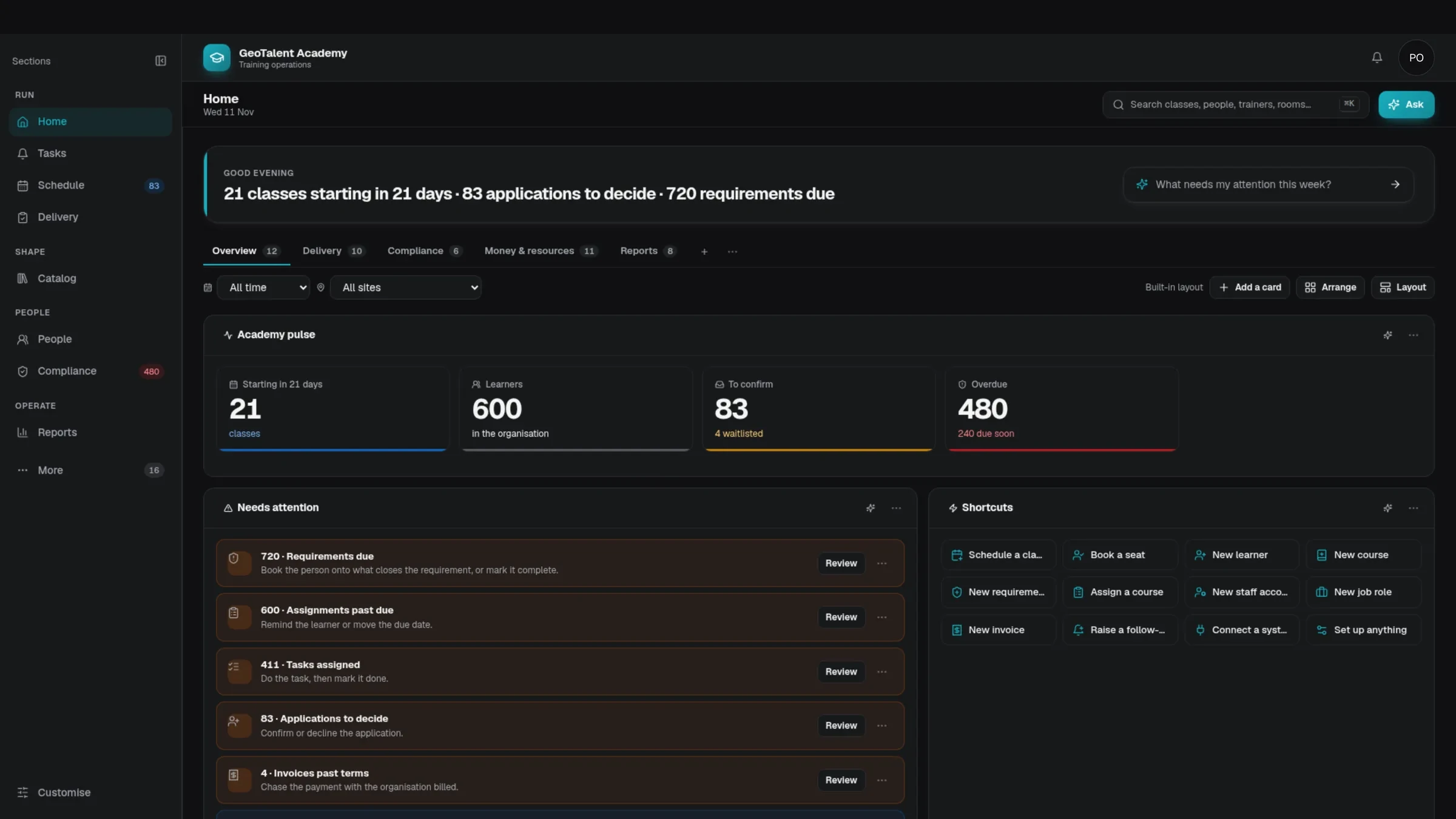
Classes starting, applications waiting, requirements due: read straight from one model of the operation.
Book a class, find who is due, build a view. Every plan is checked against your rules and waits for you.
Classes starting, learners, seats to confirm and overdue requirements, each opening the records behind it.
Work that needs a person, queued with the next step beside it.
Add cards, rearrange tabs and change the layout without a developer.
An expired ticket stops a crew. A double-booked trainer cancels a class. A missing record fails an audit. In regulated work, no training gap is small. GeoTalent Academy checks every booking against your rules, tracks every requirement to its due date, keeps the record that proves it and asks a person before anything changes.
Every requirement for every person is tracked to its due date, most urgent first, so who is due is known before the rota is set, not at the gate.
Chosen first by defence and government, where training records are audited and cannot be wrong. Every industry since trains to its own rules; the record works the same way in all of them: who needs what, who holds it, when it runs out, and the class that renews it.
Some training is taken on screen, some in a room with a trainer, some in a live class online, and most skills are still learned on the job. The Academy keeps all four on the same courses, people and requirements.
Built in the Studio from your own library, published to the catalogue and tracked on each person's record.
Rooms, trainers and seats checked against your rules before anything is booked, with attendance and results on the class roster.
Scheduled like any other class, with its online details, roster and attendance in the same place.
A supervisor shows, then checks. The requirement, the result and the date it runs out sit on the same record as every course.
The Studio is part of the Academy, so the course you build is the course you schedule, assign and report on. Give the assistant a brief and the files you already have. It plans the course and writes each lesson with something for the learner to do. Every page stays marked as not signed off until a person has reviewed it, and learners take the course in a portal you design, on a laptop, a tablet or a phone.
Say who the course is for, what they must be able to do afterwards and how long it should run. Add the Word, PowerPoint, PDF or Excel files you already have, or paste your notes.
A 45-minute course on hot work permits, briefed with a Word procedure, a PowerPoint toolbox talk, an Excel permit register and pasted handover notes.
Recorded in the Academy in a demo organisation. The assistant's replies were prepared for the recording, the recordings are shortened, and the outlines round the tablet and phone screens are added.
From a typed request to a signed-off record: the Academy doing the work, in a demo organisation.
Type what you need in your own words, then plan it: the soonest free dates, a free room and a trainer cleared to teach it, each checked against your rules. Nothing is booked until you press Schedule.
Each person has one place for their learning: what is due, what they have started, their classes, their requirements and their record. A lesson stops where they stop and opens at the same step on the next device.
The learner's home shows what is due, the course under way, their classes and their requirements. Resume opens the lesson at the step where they stopped.
One demo learner on a tablet: the home page, then Resume, which opens lesson 1 at step 2 of 4 with the earlier answer still in place.
Recorded in the Academy in a demo organisation, with a member of staff viewing a fictional learner's page. The recordings are shortened, and the outlines round the tablet and phone screens are added.
Ask sits beside every page of the Academy. Say what you need in a sentence and the assistant sets the change out. Your own rules are checked before anything is saved: a rule set to Stop holds the change and tells you which rule it was. What passes is made, kept in the trail and there on every device.
Open Ask on any page and type what you need. Here it is a class: a one-day course, a date and a room. The assistant sets the class out, and the Academy checks it against your rules before anything is saved.
The Schedule board. The request names Room 1, which already has a class that day, so the Academy's own rules card stops it.
Recorded in the Academy in a demo organisation. The assistant's replies were prepared for the recording, the recordings are shortened, and the outlines round the tablet and phone screens are added.
Every session is checked against eight scheduling rules before it is booked, and every requirement is tracked to its due date. Move the sliders to see what that means for an operation your size.
Each dot is a session this month, checked against 8 rules.
Simple arithmetic on your numbers: it shows how much checking the Academy takes on, not a promised saving. The eight rules are the planner's own: room and trainer clashes, trainer clearance, capacity, lead time, teaching load, holidays and weekends.
GeoMetrix Data Systems starts building training software in Victoria, British Columbia.
Fortune 500 companies and governments across almost every industry: defence, aerospace, semiconductors, pharmaceuticals, energy, food, finance, transport and more.
Records tied to flight simulators, tool qualifications and audits, where a lapsed qualification stops work.
Three decades of know-how on one connected model, with agents and customisation built in.
Each organisation you train can have its own portal, with its own look, the courses it shows and the people who can come in. In the designer, learners, instructors, supervisors and client contacts each get their own menu and pages, built from a list of ready-made components.
Every portal is listed with who it is for, how many clients it serves, the courses it shows and how bookings are paid. Open one for its settings: audience, courses, prices, payment, look and languages.
Four demo client portals, then one opened and its designer.
Recorded in the Academy's portal designer in a demo organisation. The pages show sample content, the recording is shortened and nothing was saved.
Bring in HR, finance, calendars, mail and the systems your training already depends on. When a system has no connector, one can be built from its API documentation. And you can add your own screens, agents and workflows around the Academy.
See GeoTalent Academy running on your courses, your people and your systems.